📒 Personal Dictionary
Overview
The Personal Dictionary feature in the Nabla 'Settings' allows user to add words that are frequently mistranscribed. These might include terms affected by accents, speech variations, or unfamiliar proper nouns. By customizing the dictionary, users can improve the accuracy of clinical notes and save time by reducing transcription errors.
How to use it
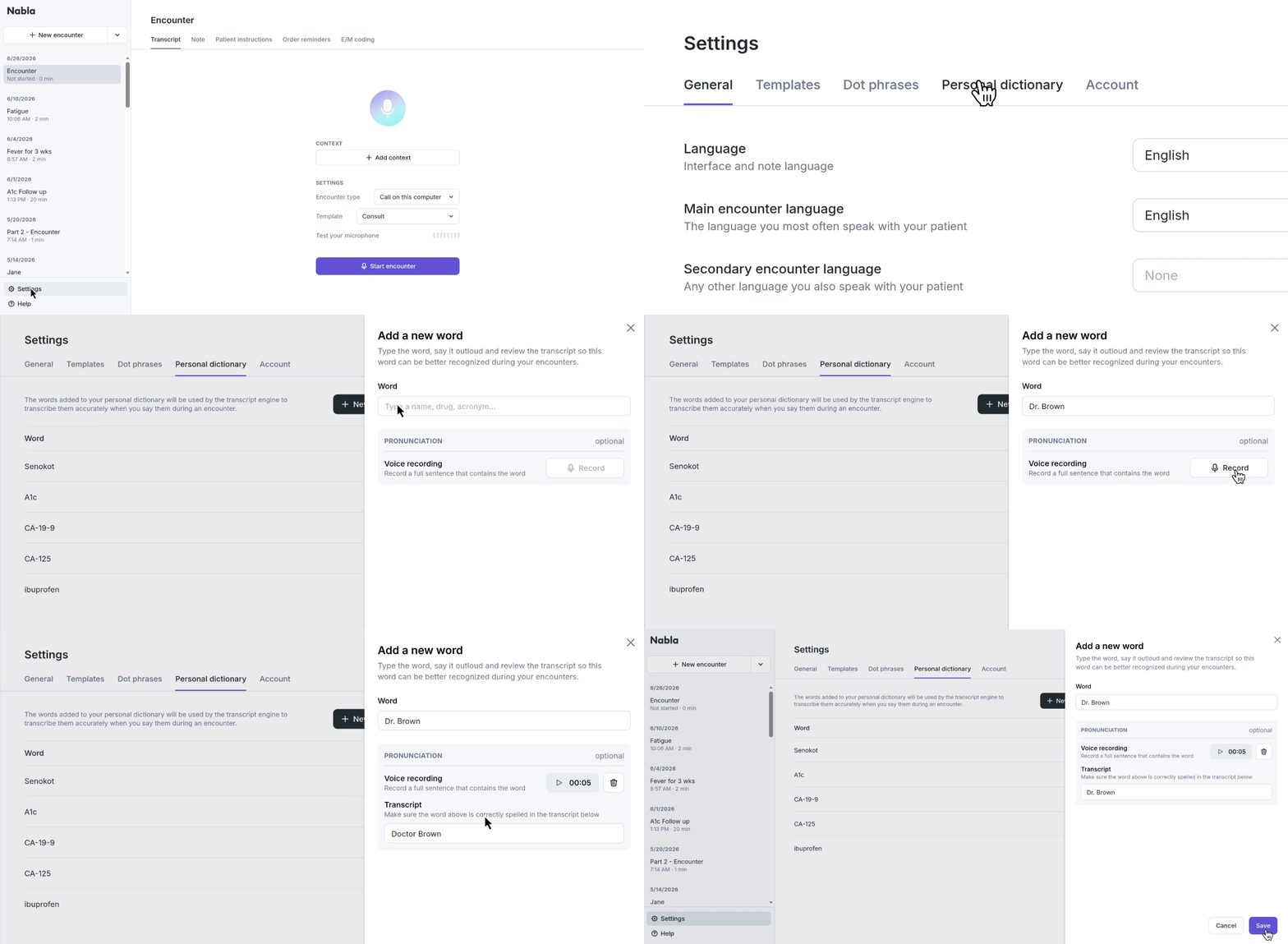
Go to the Personal Dictionary tab in the Nabla 'Settings'
To add a word
Enter the word
Type the word to be add.
If needed, select the appropriate language (i.e. English, Spanish)
Record a sentence
Verbalize the word to demonstrate how it is pronounced.
Example: For "ibuprofen," verbalize, "ibuprofen"
Review the transcription
Check that the transcription is accurate
If necessary, make edits to ensure accuracy
Click 'Add word'
Once a word is added to the Personal Dictionary, it will automatically be used for future transcriptions
Manage your words
The Personal Dictionary tab will show all of the words a user has added.
To remove a word, hover over it and click on the trash bin icon.